

It is 4:55 on a Friday, the toddler room is being wiped down, and you have two browser tabs open that you have avoided all week. One is a Brightwheel demo booking. The other is a Procare quote request. Both promise to run your billing, check-in, daily reports, and parent messages in one place. Neither will tell you what it costs until you sit through a call.
Here is the straight answer, so you can close one of those tabs right now. Both are good childcare management platforms, and the better choice depends almost entirely on your size and how complicated your billing is. Brightwheel usually wins for a small or single-site center that wants the simplest setup and the best parent app. Procare usually wins for a larger or multi-site operation with subsidy families, co-pays, and real accounting needs. Neither publishes a hard price, and neither does the thing that actually fills your empty spots. This post lays out the real costs, the feature trade-offs, and where both leave money on the table.
What this post covers
- The 30-second verdict
- What each tool actually is
- What each one really costs
- Feature by feature
- Three center sizes, three answers
- The migration cost nobody quotes
- The questions that force a real number
- The one job neither tool does
- A compliance note
- Objections, answered
- FAQ
The 30-second verdict
If you run one site with mostly private-pay families and want to be up fast, pick Brightwheel. It is the easier tool, families like the parent app, and reviewers rate it a touch higher on ease of use. On Capterra it sits at 4.7 stars across 3,255 reviews.
If you run a bigger operation, multiple rooms or locations, with subsidy families, sliding co-pays, and an accountant who needs real reports, pick Procare. It handles messy billing better and scales into multi-site reporting in a way Brightwheel was not originally built for. Procare holds 4.6 stars across 2,803 Capterra reviews, and the independent Software Advice head-to-head lands on the same split: Brightwheel for simplicity, Procare for billing depth.
That is the decision. The rest is the detail you want before you spend money, because the sticker price is not the real price.
What Brightwheel and Procare actually are
Both are childcare management platforms. They run the operational side of a center for families already enrolled: attendance and check-in, tuition billing, daily reports and photos, and two-way parent messaging. If you are still doing that on paper, either tool is a large step up. But they come at it from different histories, and that history still shows.
Brightwheel was built as an app first, so the parent experience feels modern and the admin side is quick to learn. Directors report being running within a day or two rather than weeks. It bundles billing, check-in, messaging, admissions, and curriculum into one app.
Procare grew up around desktop accounting. That is not an insult: it handles the hard billing cases better, like subsidy payments, split family accounts, and co-pays that change mid-month, plus the reporting a multi-site owner or bookkeeper needs. The trade-off is a steeper learning curve and a modular setup.
The honest framing: Brightwheel optimized for the parent and the busy director, Procare for the books and the bigger operation.
What each one really costs in 2026
Here is the part both companies make you work for. Neither publishes a straightforward price. Brightwheel’s page routes you to a specialist and says Premium pricing is tailored to your enrollment size. Procare gives custom quotes. So treat every figure below as a starting point for your call, not a quote.
Brightwheel. One useful detail: Brightwheel offers a free plan for small programs, with basic messaging, check-in, and invoicing. The paid Premium plan holds the real features, and its cost is tied to your enrollment size, Brightwheel’s own way of saying the bill scales as you fill seats. Third-party sites report a base fee in the low tens of dollars plus a small per-child charge, but Brightwheel will not confirm a number, so hold that loosely. The shape is what matters: your bill grows with your roster.
Procare. Procare prices in modules, and states on its own site that there are no setup fees and no contracts, a real advantage if an annual lock-in has burned you before. Its in-home tier is quoted around $25 a month. For a licensed center, GetApp puts the base platform near $85 a month, with the check-in app, parent messaging, and billing portal as add-ons, so the realistic all-in for a small center lands closer to $100 to $150 once the parent features are on.
Two costs neither page leads with matter more than the subscription. Payment processing: both run tuition through their own built-in payments and take a cut of every card transaction. Neither publishes its exact rate, and card processing commonly runs around 2.9% plus 30 cents a transaction. On a center collecting $40,000 a month, a rate near 2.9% is well over $1,000 a month, far more than the software itself, so ask both for the exact rate and whether ACH is cheaper. Hardware: Procare sells physical check-in kiosks as a separate line item, while Brightwheel runs check-in on a tablet you already own.
Illustrative only: how an enrollment-scaled bill climbs as a center grows, modeled on a small base fee plus a per-child charge, the shape Brightwheel describes when it ties pricing to enrollment size. Not vendor quotes; rate estimates via GetApp. Confirm your own number on a demo.
Feature by feature: where each tool wins
On price the two are close enough that features and fit should drive the choice. Here is the head-to-head, from the independent Software Advice and G2 comparisons plus the Capterra profiles.
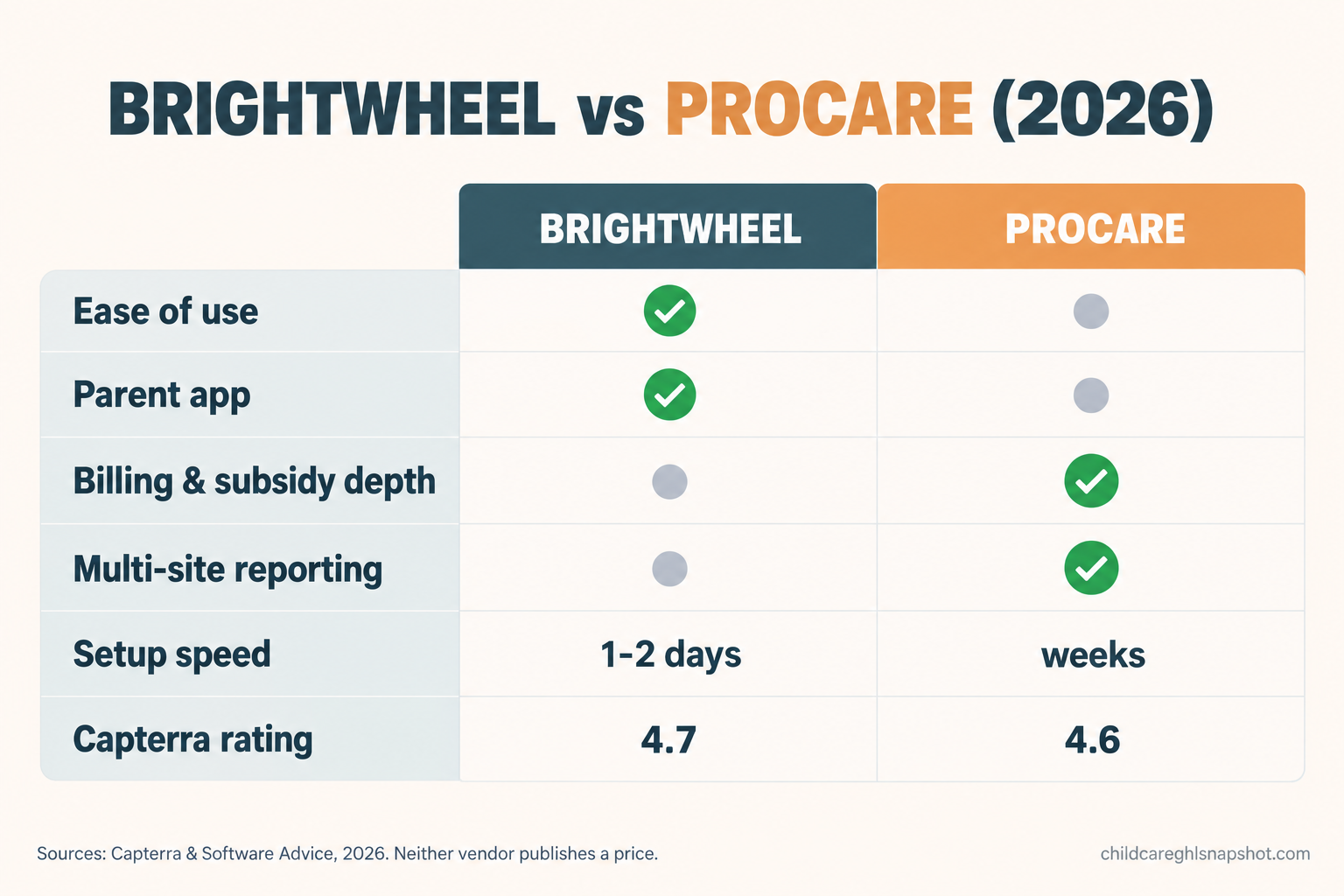
| What you need | Brightwheel | Procare | Who wins |
|---|---|---|---|
| Ease of use / setup speed | Very high, running in a day or two | Steeper, more to configure | Brightwheel |
| Parent app and messaging | Modern, families like it | Solid, less polished | Brightwheel |
| Daily reports, photos, learning | Strong | Strong | Tie |
| Check-in / attendance | Tablet-based, contactless | Tablet or physical kiosk | Tie (kiosk edge to Procare) |
| Tuition billing basics | Good | Good | Tie |
| Subsidy, co-pay, split accounts | Workable | Deep and mature | Procare |
| Multi-site reporting / accounting | Improving | Built for it | Procare |
| Capterra rating | 4.7 (3,255 reviews) | 4.6 (2,803 reviews) | Brightwheel, narrowly |
Three of those rows deserve a note, especially where a tool breaks.
Ease of use is not a small thing. The most expensive software is the one your teachers will not use. Brightwheel’s edge, 4.6 versus Procare’s 4.4 on Capterra, shows up as higher staff adoption in the first month. Where Brightwheel breaks: some directors outgrow its reporting once they add a second site and want consolidated financials, which is exactly when they look at Procare.
Billing depth is where Procare earns its keep. If you take state subsidy, run sliding-scale co-pays, or split a bill between two households, Procare handles the edge cases with less manual patching. Where it breaks: the same power makes it slower to set up, and reviewers report longer support waits when something goes sideways. Budget for a real onboarding.
Payments break the same way in both. Any tool that runs tuition through its own billing can misfire: a late-fee sequence that keeps running after a parent paid at pickup, or an autopay that double-charges a corrected invoice. That is a childcare-billing problem, not a Brightwheel-versus-Procare one. Test the refund and corrected-invoice paths before you automate for every family. Getting tuition autopay and late-payment recovery right is a whole playbook on its own.
Capterra review volume, a rough signal of how widely each tool is adopted. Source: Capterra, 2026. Review counts drift week to week, so check the live number before you decide.
Three center sizes, three different answers
There is no single winner because the tools behave differently as you grow. Here is the same decision run three ways.
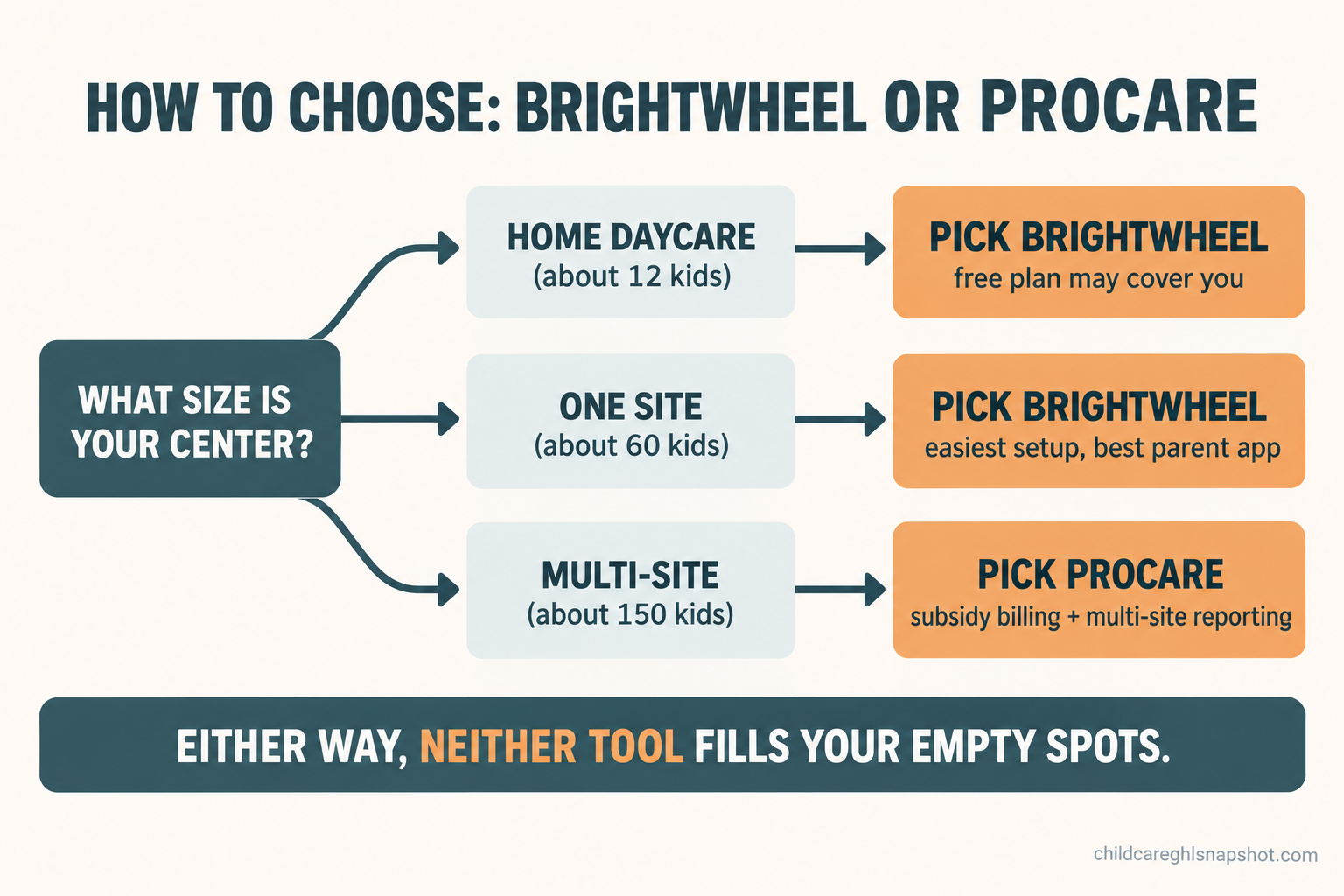
The home daycare (about 12 children)
At twelve kids, keep it simple and cheap. Brightwheel’s free plan may cover you, and if not, its Premium is easy to run solo. Procare’s in-home tier around $25 a month is also fine. Features barely diverge at this size, so choose on which app feels better in your hand during the demo. What threatens a home daycare is not billing, it is missing the inquiry that came in while you were changing a diaper, and no management app fixes that.
The single center (about 60 children)
This is Brightwheel’s sweet spot: one site, mostly private pay, a director who does not want a two-week implementation. Brightwheel gets you live fast and the parent app keeps families happy. Consider Procare only if you already have complex subsidy billing, because at 60 kids that complexity, not the headcount, is the reason to take on its steeper setup.
The multi-site group (about 150 children across locations)
Now Procare pulls ahead. Consolidated financials across locations, subsidy reconciliation, and staff scheduling at scale are what it was built for. This is also where Brightwheel’s enrollment-scaled pricing is felt most, so price both against your actual roster, not a monthly number that sounded fine on a call. It is also where the enrollment gap hurts most: a multi-site group lives or dies on keeping every location’s waitlist moving, a different system from the one tracking nap times.
The migration cost nobody quotes you
Whichever way you are moving, into Brightwheel, into Procare, or between them, the subscription is not the real cost of switching. The switch itself is, and it is a one-time project to budget for on purpose. Four line items to price before you commit:
- Data import. Getting your child records, family accounts, and billing history into the new tool. Ask whether the vendor does it and whether it is included.
- Overlap. You will pay for both tools at once for two to four weeks while you verify everything moved correctly. That double bill is real.
- Staff hours. Someone checks data, and teachers learn the new check-in flow. That is payroll you are spending on the move.
- The export out. Before you leave your current tool, confirm you can export your records, in a usable file, for free. A tool that makes your data hard to take has locked you in quietly.
Procare’s no-contract, no-setup-fee stance helps here, since it lowers the cost of trying it and of leaving if it does not fit. Confirm it in writing; a stance on a blog post is not a line in your agreement.
Steal this: the questions that force a real number
Since both vendors gate the price, you have to extract it. These are tuned for a Brightwheel-versus-Procare call, aimed at where each one hides cost.
- “What is the all-in monthly total for a center my size, [X] children, including the parent app and billing? Put it in an email.”
- For Brightwheel: “Since pricing is tied to enrollment size, what does my bill become at [X plus 20] children? I want the number after I grow, not just today’s.”
- For Procare: “Which features are in the base plan and which are paid add-ons? List every add-on and its price. I do not want to discover the parent app is extra.”
- “What is the card-processing fee on tuition, and is ACH or bank transfer cheaper?”
- For Procare: “You say no setup fees and no contracts. Can you put both in writing, plus any data-migration cost?”
- “Is there any hardware or kiosk cost, or does check-in run on a tablet I already own?”
- “If I leave, can I export all my records myself, in a standard file, at no charge?”
The email ask in question one does most of the work. A number a rep will put in writing is a real number. A number they will only say out loud is a starting position.
The one job neither tool does
Here is the honest part, and it is why this comparison does not end your software search. Everything above, Brightwheel and Procare both, is management software. It runs the center for families already enrolled. It does not fill an empty spot, and that matters, because in most markets the demand is already there. The Center for American Progress found that 46% of young children live in a licensed child care desert as of 2025, so families are looking and the bottleneck is follow-up, not interest. With the national average price of care now $13,184 a year per Child Care Aware of America, every enrolled family is real revenue to win or lose on a slow callback.
The form filled out at 9pm, the tour that no-shows, the waitlist parent who went quiet in July: none of those is a nap-tracking problem. That is a speed-to-lead problem, and neither tool touches it. They start working after the family has said yes.
This is the gap the Childcare Snapshot is built for: a done-for-you GoHighLevel system for the enrollment side, with instant inquiry replies, tour reminders that cut no-shows, waitlist nurture, and review requests. It is a one-time $997 setup, not a per-child bill, and runs alongside whatever management tool you pick. For the fuller picture, our childcare software pricing teardown covers the whole category.
A compliance note before you automate texts
One thing no pricing page mentions but every center needs to get right: automated messaging. If you text parents, two federal rules apply. The TCPA governs consent for automated texts, and A2P 10DLC is the carrier registration business texting now requires in the United States. In plain terms, get a clear opt-in before you text a family and register your number, or your messages start getting filtered out.
On child records, clear up one myth. FERPA, the school-records law, generally does not apply to private licensed daycares, so do not let a vendor scare you with it. Your real obligations come from your state’s licensing rules on child-record confidentiality and on photo and video consent, which you cannot make a condition of enrollment. The line to hold: never name or show a specific child in marketing without consent on file, and keep automation touching attendance or health data in the parent-only channel, never your marketing list. Our guide to texting daycare parents legally has the full walkthrough.
Objections, answered honestly
“I already pay for Brightwheel. Do I have to switch to Procare?” No. If Brightwheel works and your billing is not complicated, stay. The reason to move is a specific problem: consolidated multi-site financials or subsidy billing that Brightwheel makes you patch by hand. Switching for its own sake is a cost with no payoff.
“Isn’t Procare cheaper because there is no contract?” No contract lowers your risk, not necessarily your monthly cost. Procare’s modular pricing adds up once you switch on the parent app, payments, and a kiosk. Price the all-in number with your add-ons before you call it cheaper.
“Do I need to be technical to run either one?” For day-to-day use, no, and Brightwheel is the easier of the two. Procare asks more at setup, so budget for onboarding. The enrollment side is why the Snapshot is done-for-you rather than a tool you configure.
“Can I just decide later?” You can, but waiting is not free. Every week without a working follow-up system is tours that no-show and inquiries that go cold, and those are the families that pay for whichever management tool you choose. The management decision can wait a month. The enrollment leak should not.
Your questions, answered
Is Brightwheel or Procare cheaper in 2026?
Neither publishes a hard price, so it depends on your size and add-ons. At a home daycare they are close: Procare's in-home tier is around $25 a month and Brightwheel offers a free plan for small programs. At a licensed center, Procare's base is reported near $85 a month before add-ons, while Brightwheel's cost scales with your enrollment. Get an all-in number in writing from both.
Which is better for a small single-site daycare?
Brightwheel, usually. It is easier to set up, families prefer the parent app, and it rates a touch higher on ease of use. Choose Procare only if you already have complex subsidy or co-pay billing that needs its deeper engine.
Which is better for a multi-site childcare group?
Procare, usually. It was built for consolidated multi-site financials, subsidy reconciliation, and accounting-grade reporting. Brightwheel is improving here but was designed around a single site and a great parent experience.
Do Brightwheel and Procare charge payment processing fees?
Yes. Both run tuition through their own built-in payments and take a cut of card transactions. Neither publishes its exact rate, and card processing commonly runs around 2.9% plus 30 cents per transaction. Ask each vendor for the exact rate and whether ACH is cheaper, because on a full center this fee usually costs more than the software itself.
Will Brightwheel or Procare help me get more enrollments?
Not really. Both manage families who have already enrolled. They do not follow up on new inquiries, recover tour no-shows, or nurture a waitlist. That speed-to-lead job is what the Childcare Snapshot handles alongside your management app.
So, back to those two open tabs. You do not have to sit through both demos blind. If you are one site and want simple, book the Brightwheel call. If you are bigger and your billing is a mess, book the Procare call. Ask the seven questions, get the all-in number in an email, and pick the tool that fits your size. Then fix the part neither tab was ever going to solve: getting the next family to actually enroll. You can see exactly what installs for that in 24 hours.