🎈 Limited time — claim your 10% coupon · Closing in00d00h00m00s
Contact actions

GoHighLevel contact quick actions: one tap, job done

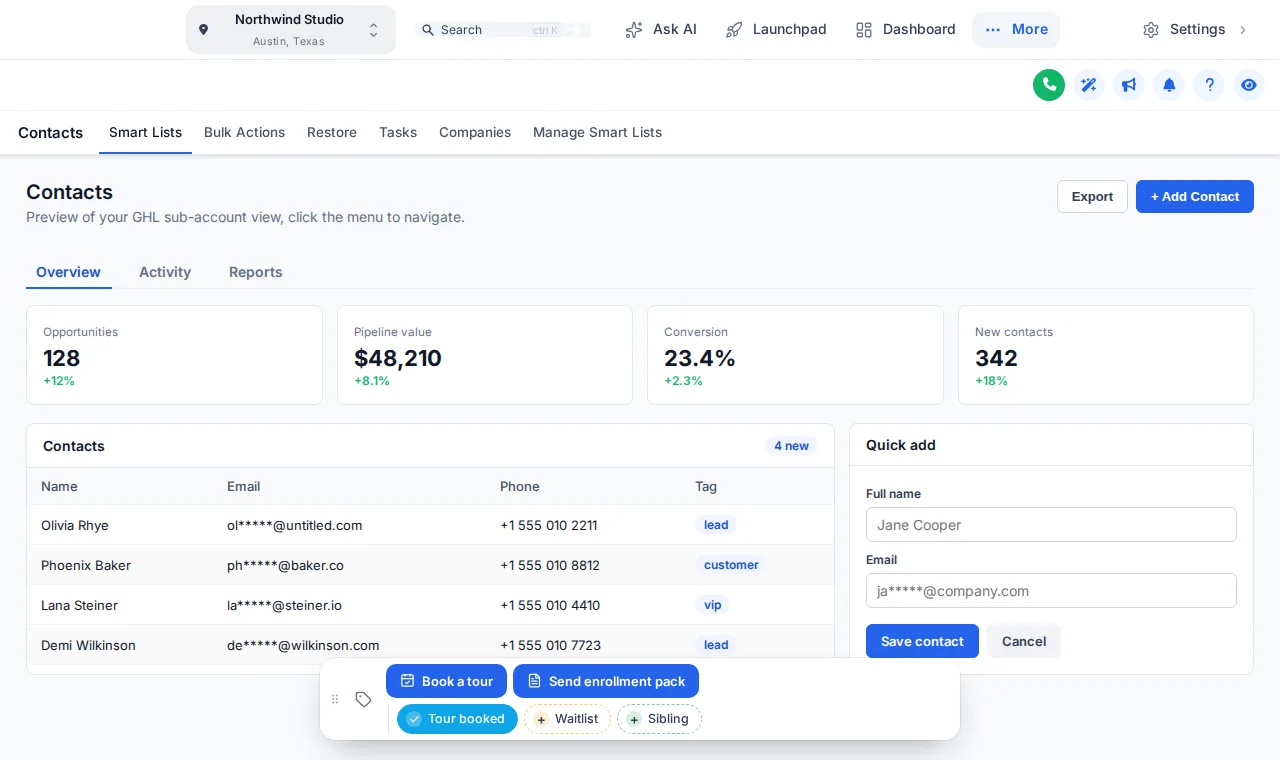
A family calls back after the tour. Instead of hunting for the right tag and workflow, your front desk taps Tour booked or Waitlist on their record and the right follow-up starts.

In short: contact quick actions put your center’s most common jobs one tap away on every family record in GoHighLevel. Each tap adds a tag or saves custom fields, which your existing workflows already know how to handle.

Real moments

When would my team use a quick action?

📞

After a phone inquiry

Tap Book a tour. The tag starts your tour-confirmation workflow and the family gets the address and parking note by text.

⏳

When the room is full

Tap Waitlist. The family joins your waitlist nurture and you never forget to call them when a spot opens.

📝

Enrollment details

Press Update enrollment to save the preferred start date and room into custom fields in one short form.

⭐

A happy pickup

A parent says something lovely at pickup. Tap Ask for a review and your review request goes out that evening.

Try the contact actions bar

These are the real controls on a sample contact. Tap a tag, open Update enrollment or drag the bar. Nothing is saved.

Position
Show
Theme

The real contact actions bar. Tap a quick tag, press Update enrollment to open its form, or drag the bar. Nothing is saved in the preview.

⤢

Loading the live preview…

Contact actions bar with Tour booked, Waitlist and Sibling quick tags on a sample GoHighLevel contact page
Our childcare quick tags on a sample contact page.

What can the bar do?

  • Quick tags that toggle on and off, each in its own color or your brand color
  • Buttons that add or remove tags and show a friendly confirmation
  • Buttons that open a short form and save custom fields
  • 6 screen positions, draggable, remembers where staff put it
  • Icons for every button, chosen to match the action
How it works

How do you set up quick actions?

  1. Pick the moments

    List the three to six things your team does most on a family record: book a tour, add to waitlist, send the enrollment pack.

  2. Connect to workflows

    In the editor, set each button to add or remove a tag, or save custom fields, which your existing GoHighLevel workflows react to.

  3. Style and place it

    Pick brand colors for the chips and one of 6 positions on screen; staff can drag it if they prefer.

  4. Test with your team

    Try every button on a sample contact first so nothing fires by surprise on a real family.

Ready when you are

Fewer clicks between a phone call and the next step

Contact actions come with mega menus, the dashboard designer and the pipeline designer in Growing Bright.

Start Growing Bright · $399Rather talk it through? Book a callSecure one-time payment by Stripe · login emailed within minutes
Quick action questions

Contact quick actions questions

How the buttons work with tags, fields and your existing workflows.

Something else? Ask us directly and a person from our support team replies.

What are GoHighLevel contact quick actions?
They are a small bar of buttons and quick tags that sits on every contact page in GoHighLevel. One tap adds a tag, removes it, or opens a short form that saves custom fields, so common jobs take one click instead of five.
Can a button start a workflow?
Yes, through tags. A button adds a tag such as “book tour”, and your existing GoHighLevel workflow that triggers on that tag does the rest, for example sending the tour confirmation text.
Can a button save information to the family record?
Yes. A button can open a short form, for example preferred start date and room, and save the answers straight into the contact’s custom fields.
Does it replace GoHighLevel’s own contact page?
No. It adds a bar on top of the normal contact page. Everything GoHighLevel provides stays where it was.
Where does the bar appear on screen?
In one of 6 positions: bottom center, bottom left, bottom right, top center, top left, top right. Staff can drag it out of the way if they need to.
Is it safe for family data?
The bar only adds tags or writes custom fields you define on contacts your staff can already open. It respects GoHighLevel’s user permissions and sends nothing outside your account.
Which package includes contact actions?
The contact actions bar starts in Growing Bright ($399 one-time).
Packages

Contact actions start in Growing Bright

Package 1 of 3

Starter Steps

$149one-time · USD

A Starter Steps account: every theme, UI kit, dark mode and login page design, ready for you to brand and install in minutes.

  • All 27 themes and 11 UI kits, with dark mode
  • Your logo and brand colors, with GoHighLevel’s built-in blues remapped
  • Sidebar or top-bar layout
  • All 16 animated login page designs (sign-in, two-factor, reset)
  • Privacy mode
  • 1 workspace, 10 saved templates, 3 team members, 5 allowed domains
✉ Login in minutes∞ Lifetime access
Get Starter Steps · $149
Includes this module
Package 2 of 3

Growing Bright

$399one-time · USD

Everything in Starter Steps, plus the tools to arrange the back office around how a center runs: mega menus, a dashboard designer, an enrollment pipeline designer and one-tap contact actions.

  • Everything in Starter Steps
  • Mega menus and a floating quick menu
  • Dashboard designer with 18 designs
  • Pipeline designer with 12 enrollment board designs
  • Contact actions bar with quick tags and buttons
  • Announcements and sub-account self-service
  • 2 workspaces, 25 saved templates, 5 team members, 10 allowed domains
✉ Login in minutes∞ Lifetime access
Get Growing Bright · $399
Package 3 of 3

Campus Complete

$799one-time · USD

The whole campus: everything in Growing Bright, plus the parent-facing popups, notifications, calculators and floating widgets for your website, and the editor branded as your own.

  • Everything in Growing Bright
  • Popups: 43 templates, up to 15 live
  • Notifications and social proof: 94 templates, up to 15 live
  • Calculators: 134 templates, up to 10 live
  • Floating widgets: 51 templates, up to 10 live
  • Widget leads sent to GoHighLevel
  • White-label branding of the editor (your logo, colors and name)
  • 3 workspaces, 50 saved templates, 10 team members, 25 allowed domains
✉ Login in minutes∞ Lifetime access
Get Campus Complete · $799

Independent product. GoHighLevel and HighLevel are trademarks of HighLevel Inc. Childcare & Daycare GHL Snapshot is an independent business and is not an official partner, employee or reseller of HighLevel. GHL Customizer accounts run on the GHL Customer Care customizer platform; you customize and install the look yourself. Screenshots on this page are our own captures of the customizer's preview engine running on sample data.