
🎈 Limited time — claim your 10% coupon · Closing in00d00h00m00s
Calculators

A GoHighLevel calculator widget that answers “what will it cost?”

Fees are the question every parent asks and the one they least like asking out loud. A calculator on your website lets them explore schedules and savings privately, with your real rates, then book a tour.

134 templates14 types13 style presets
Type
Template
Style

Move the sliders or type your own numbers. Everything recalculates as you go.

⤢

Loading the live preview…

The short answer

Why put a calculator on a childcare website?

A calculator answers the cost question before a parent has to call. It builds trust because the numbers are yours and visible, it keeps families on your page longer, and it ends with a natural next step: book a tour to see the rooms.

  • Full-time vs part-time weekly cost
  • Sibling discount savings
  • All-inclusive fee vs paying for meals and supplies separately
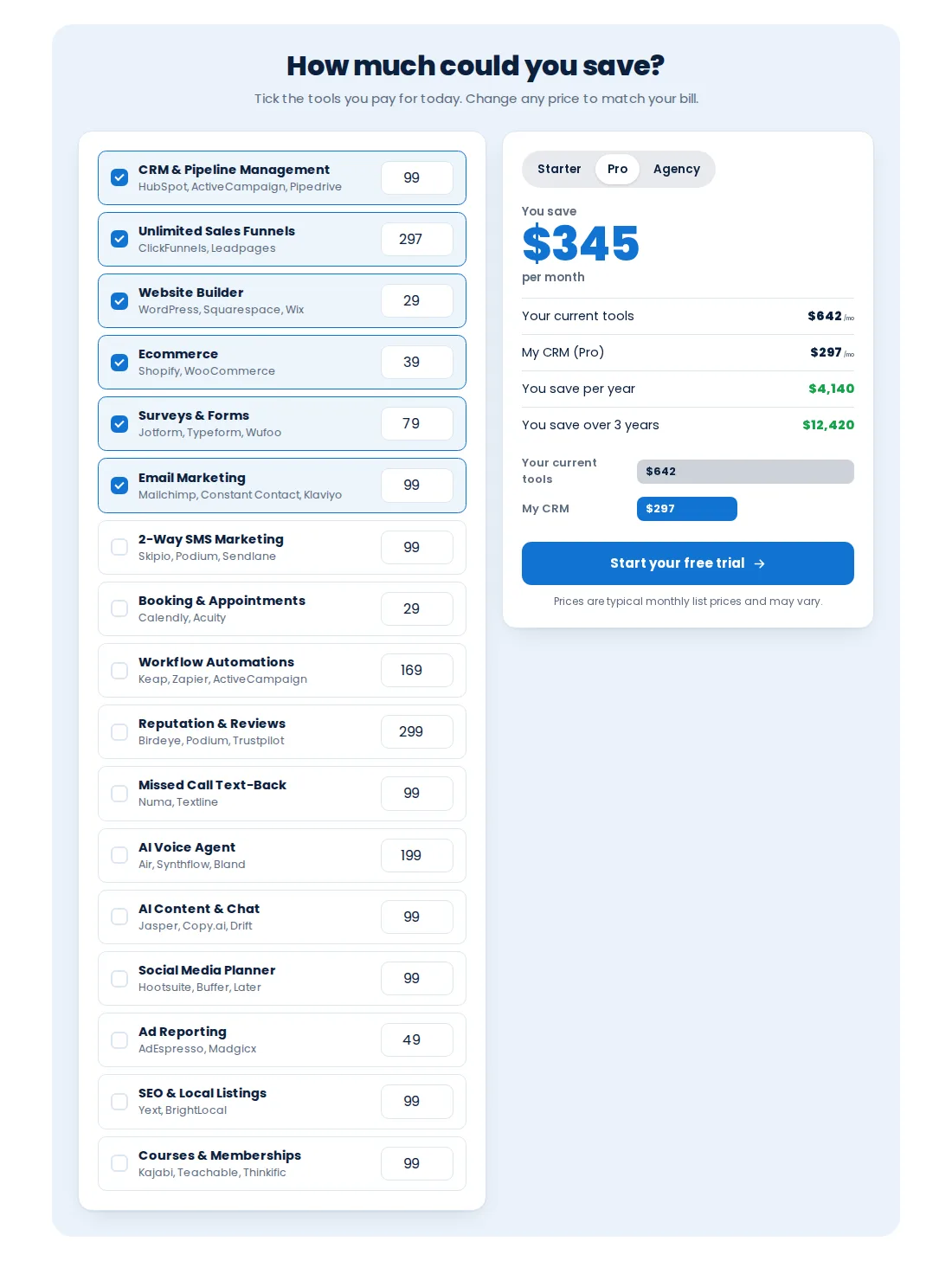
Savings calculator template with tool checkboxes and a monthly total
The savings calculator template before you enter your own options and rates.
The catalogue

14 calculator types

Savings

  • Stack replacement table (13)
  • Savings calculator (9)
  • Us vs them (7)

Return on investment

  • ROI calculator (10)
  • Speed to lead (10)
  • No-show reducer (10)
  • Time saved by automation (10)
  • Database reactivation (10)
  • Email and SMS marketing ROI (10)

Add-on value

  • Missed call text-back (10)
  • Reviews and reputation (10)
  • AI agent vs staff (10)

Pricing and quotes

  • Reseller profit (10)
  • Price builder (5)
How it works

How do you build your calculator?

  1. Choose the question

    Decide what a parent want to work out? Weekly vs monthly cost, sibling savings, or full-time vs part-time.

  2. Set your numbers

    Enter your own rates and options in the editor; the calculator never guesses prices for you.

  3. Style it

    Use the template style or one of 13 style presets, matched to your website.

  4. Place and test

    Embed it on the right page of your GoHighLevel site, check it on phones, and add a clear next step such as Book a tour.

Calculator questions

GoHighLevel calculator questions

Which calculator suits a center, whose numbers it uses and how parents use it.

Something else? Ask us directly and a person from our support team replies.

Can I add a calculator to a GoHighLevel website?
Yes. The customizer’s calculator engine embeds on GoHighLevel sites and funnels. There are 134 templates across 14 types.
What would a childcare center use a calculator for?
Most often a savings or cost calculator: comparing full-time with part-time schedules, showing a sibling discount, or comparing your all-inclusive fee with paying separately for meals and supplies. Agencies also use ROI calculators to sell their services.
Whose prices does it use?
Yours. You enter your rates and options in the editor. The calculator only shows the numbers you set, so it is always accurate to your fee schedule.
Can parents use it on a phone?
Yes. Every template is responsive and recalculates as numbers change, which suits parents comparing options on a phone.
Can the calculator capture a lead?
Yes. Put a clear call to action next to the result, such as booking a tour, and widget leads are sent to GoHighLevel so they land in your existing pipeline.
How many calculators are included?
Campus Complete gives you all 134 calculator templates, with up to 10 live at once.
Which package includes calculators?
Calculators are part of Campus Complete ($799 one-time).
Ready when you are

Answer the fee question before it is asked

Up to 10 live calculators plus popups, notifications and floating widgets in Campus Complete.

Start Campus Complete · $799Rather talk it through? Book a callSecure one-time payment by Stripe · login emailed within minutes
Packages

Calculators are part of Campus Complete

Package 1 of 3

Starter Steps

$149one-time · USD

A Starter Steps account: every theme, UI kit, dark mode and login page design, ready for you to brand and install in minutes.

  • All 27 themes and 11 UI kits, with dark mode
  • Your logo and brand colors, with GoHighLevel’s built-in blues remapped
  • Sidebar or top-bar layout
  • All 16 animated login page designs (sign-in, two-factor, reset)
  • Privacy mode
  • 1 workspace, 10 saved templates, 3 team members, 5 allowed domains
✉ Login in minutes∞ Lifetime access
Get Starter Steps · $149
Package 2 of 3

Growing Bright

$399one-time · USD

Everything in Starter Steps, plus the tools to arrange the back office around how a center runs: mega menus, a dashboard designer, an enrollment pipeline designer and one-tap contact actions.

  • Everything in Starter Steps
  • Mega menus and a floating quick menu
  • Dashboard designer with 18 designs
  • Pipeline designer with 12 enrollment board designs
  • Contact actions bar with quick tags and buttons
  • Announcements and sub-account self-service
  • 2 workspaces, 25 saved templates, 5 team members, 10 allowed domains
✉ Login in minutes∞ Lifetime access
Get Growing Bright · $399
Includes this module
Package 3 of 3

Campus Complete

$799one-time · USD

The whole campus: everything in Growing Bright, plus the parent-facing popups, notifications, calculators and floating widgets for your website, and the editor branded as your own.

  • Everything in Growing Bright
  • Popups: 43 templates, up to 15 live
  • Notifications and social proof: 94 templates, up to 15 live
  • Calculators: 134 templates, up to 10 live
  • Floating widgets: 51 templates, up to 10 live
  • Widget leads sent to GoHighLevel
  • White-label branding of the editor (your logo, colors and name)
  • 3 workspaces, 50 saved templates, 10 team members, 25 allowed domains
✉ Login in minutes∞ Lifetime access
Get Campus Complete · $799

Independent product. GoHighLevel and HighLevel are trademarks of HighLevel Inc. Childcare & Daycare GHL Snapshot is an independent business and is not an official partner, employee or reseller of HighLevel. GHL Customizer accounts run on the GHL Customer Care customizer platform; you customize and install the look yourself. Screenshots on this page are our own captures of the customizer's preview engine running on sample data.